<?xml version="1.0" encoding="utf-8"?>
<feed xmlns="http://www.w3.org/2005/Atom">
	<title><![CDATA[平台]]></title>
	<link type="text/html" href="https://easyapps.biz/platform/" />
	<subtitle type="html"><![CDATA[分類文章 平台]]></subtitle>
	<rights><![CDATA[Copyright 2026, 您最好的商業創新平台 | FileMaker 明易]]></rights>
	<updated>2026-06-15T10:37:13+00:00</updated>
	<id>urn:uuid:ee33f694-f1ed-6589-7686-1db2eeea6775</id>
	<generator uri="http://www.elxis.org/" version="5.6">Elxis</generator>
	<author>
		<name><![CDATA[King Chen | MINGYI Corp]]></name>
	</author>
	<icon>https://easyapps.biz/media/images/favicon.ico</icon>
	<logo>https://easyapps.biz/media/images/logo_rss.png</logo>
	<entry>
		<title><![CDATA[次要版本已解決的問題]]></title>
		<link type="text/html" href="https://easyapps.biz/platform/filemaker-minor-version-updates.html" />
		<id>urn:uuid:e7a47de2-29f4-8733-89a8-10e79eeafa74</id>
		<updated>2024-08-09T21:20:00+00:00</updated>
		<summary type="html"><![CDATA[<img style="margin:5px; float:left;" src="https://easyapps.biz/media/images/articles2/updates-and-release-notes_thumb.jpg" alt="平台" /> <p>本頁主要記錄，次要版本有哪些內容更新，稱為已解決的問題，這在 FileMaker Pro 選單上的「幫助」>「檢查更新」，做更新。</p><div class="elx5_info" style="text-align: center;"><span style="font-size: 24px;"><em>本篇有可能隨著技術進展，而更新本文，請不定時回來查閱。</em></span></div>

<p style="text-align: center;"><span style="font-size: 24px;">＊　轉載需註明本文出處，勿修改內容，明易資訊有限公司保留一切權利，謝謝您的配合。　＊</span></p>

<p><br></p>
<p><span style="font-size: 18px;"><br></span></p>
<p><span style="font-size: 18px;">本頁是記錄次要版本解決/修正了哪些問題，以使大家在更新最新版本時，也能知道更新與解決了什麼內容，</span></p>
<p><span style="font-size: 18px;">一樣地，軟體最新版本，可以從購買後，取得的電子軟體下載 (ESD) 頁面下載就可以了，</span></p>
<p><span style="font-size: 18px;">最好先移除原來的 FileMaker Pro，或 FileMaker Server，就可以進行安裝。</span></p>
<p><span style="font-size: 18px;">註：什麼是次要版本？例如：最新版本是&nbsp;21版，次要版本如果是，21.0.2，後面的 02 就是次要版本，越新的版本，數字會往後加。</span></p>
<p><br></p>
<p><br></p>]]></summary>
		<author>
			<name>socrates</name>
		</author>
		<link rel="enclosure" href="https://easyapps.biz/media/images/articles2/updates-and-release-notes_thumb.jpg" length="8114" type="image/jpeg" />
	</entry>
	<entry>
		<title><![CDATA[Mac mini 雲端專屬主機]]></title>
		<link type="text/html" href="https://easyapps.biz/platform/dedicated-mac-mini-cloud-servers.html" />
		<id>urn:uuid:b7f1e603-2937-4148-7479-e49103033c23</id>
		<updated>2024-08-06T09:24:00+00:00</updated>
		<summary type="html"><![CDATA[<img style="margin:5px; float:left;" src="https://easyapps.biz/media/images/articles2/mac_mini_w1500px_thumb.jpg" alt="平台" /> <p>整台 Mac mini 主機給您使用，沒有限制流量。</p><p style="text-align: center;"><span style="font-size: 60px;"><br></span></p>
<p><br></p>
<p><br></p>
<p><br></p>

<p><br></p>
<h1 style="text-align: center;"><span style="font-size: 60px;">近日即將公告，敬請期待。</span></h1>
<p style="text-align: center;"><span style="font-size: 60px;"><br></span></p>
<p><br></p>
<p><br></p>
<p><br></p>
<p><br></p>]]></summary>
		<author>
			<name>socrates</name>
		</author>
		<link rel="enclosure" href="https://easyapps.biz/media/images/articles2/mac_mini_w1500px_thumb.jpg" length="11658" type="image/jpeg" />
	</entry>
	<entry>
		<title><![CDATA[Claris FileMaker 2023 重磅上市，新功能整理]]></title>
		<link type="text/html" href="https://easyapps.biz/platform/new-claris-filemaker2023.html" />
		<id>urn:uuid:632d9589-795f-cb1e-89ed-175cce318adc</id>
		<updated>2023-04-30T14:20:00+00:00</updated>
		<summary type="html"><![CDATA[<img style="margin:5px; float:left;" src="https://easyapps.biz/media/images/articles2/filemaker2023-under-the-hood_thumb.jpg" alt="平台" /> <p>Claris FileMaker 2023 重磅登場</p><p><strong>Claris FileMaker 2023</strong>　是 FileMaker 有史以來最具擴展性的最新版本(超過30年持續的進化)，Claris 繼續全神貫注使得 FileMaker 更上一層樓，讓使用者取得更大的成功果實，幫企業創造更大應用價值，從這版本還提高了將第三方軟體與 FileMaker 和 Claris Connect 整合的能力，讓更多需要隨時客制化與數位發展的創新用戶，開闢了更大可能性。</p>]]></summary>
		<author>
			<name>socrates</name>
		</author>
		<link rel="enclosure" href="https://easyapps.biz/media/images/articles2/filemaker2023-under-the-hood_thumb.jpg" length="11866" type="image/jpeg" />
	</entry>
	<entry>
		<title><![CDATA[Claris Connect 流程自動化的力量!]]></title>
		<link type="text/html" href="https://easyapps.biz/platform/claris-connect.html" />
		<id>urn:uuid:21f67029-d845-2697-0dd2-78e2e0576f79</id>
		<updated>2020-07-07T08:24:00+00:00</updated>
		<summary type="html"><![CDATA[<img style="margin:5px; float:left;" src="https://easyapps.biz/media/images/articles/claris-connect-automated-workflows_thumb.png" alt="平台" /> <p>為您的平台可實現數千種用途</p><div class="elx5_sminfo" style="text-align: center;">本篇有可能隨著技術進展，而更新本文，請不定時回來查閱；轉載需註明本文出處，勿修改內容，明易資訊有限公司保留一切權利，謝謝您的配合。</div>

<p><br></p>


<br>

<p>
    <strong>Claris Connect 已開放有免費版本（free tier），內容包含以下，不夠使用可以加購，以年租為單位，</strong> <a href="https://easyapps.biz/purchase/filemaker-query.html" target="_blank">歡迎詢價購買</a>
</p>
<ul>
    <li>根據自己的需要去建立並執行活動流，即流程步驟。</li>
    <li>每月上限最多 500 個流程步驟。</li>
    <li>可將任意數量的應用程式連接在一起，沒有應用程式限制。</li>
</ul>
<hr id="null"><br>

<p><span style="font-size: 30px;">Claris Connect 介紹</span></p>

<div class="elx_content_imagebox">
    多年來各家創新平台提供相當好用的服務，您我可能每天都在使用，像是 Dropbox、Google Maps、Mailchimp、Slack、Typeform、Trello、Office 365...等，有些服務可能是背後也已在運作，只是身在其中渾然不知。<br>

</div>
<p><br></p>

<div class="elx_content_imagebox">每個商務的工作流程中，有很多時候，要在一台裝置開許多視窗分別操作，能否串連相關又不同的服務平台，包辦您想要的工作流程，甚至整併自己的系統中一氣合成，使其更輕易的管理。<u>是的，串連不同的 APIs 服務，不需撰寫複雜的程序，就能讓自己的平台實現出數千種用途，而且操作簡單；也就是這樣蘊釀出了 <span style="font-size: 18px;">Claris Connect </span></u>。</div>
<p><br></p>
<p>Claris Connect 是基於雲端的整合平台，可讓您通過快速將應用程序無縫結合在一起而無需複雜程式編寫，讓有心想把自己工作流程做出自動化。 <br>所以善用 Claris Connect，可實現新的數位體驗，同時連接內部部署和基於雲端的應用程序與服務。 </p>
<p><br></p>
<p><br></p>
<div class="elx_content_imagebox"><img src="https://easyapps.biz/media/images/articles/ClarisConnect/Connect.png" title="Claris Connect" alt="Claris Connect 串連各種不同平台APIs" style="display: block; margin-left: auto; margin-right: auto;"></div>
<p><br></p>]]></summary>
		<author>
			<name>socrates</name>
		</author>
		<link rel="enclosure" href="https://easyapps.biz/media/images/articles/claris-connect-automated-workflows_thumb.png" length="11747" type="image/png" />
	</entry>
	<entry>
		<title><![CDATA[超前佈署 FileMaker 19 新功能]]></title>
		<link type="text/html" href="https://easyapps.biz/platform/new-filemaker19-features.html" />
		<id>urn:uuid:d99a9ba7-a76f-8795-d396-d42068f39e23</id>
		<updated>2020-05-05T19:15:00+00:00</updated>
		<summary type="html"><![CDATA[<img style="margin:5px; float:left;" src="https://easyapps.biz/media/images/articles/Claris-Logo_thumb.png" alt="平台" /> <p>重大更新報導</p><div class="elx5_sminfo" style="text-align: center;">本篇有可能隨著技術進展，而更新本文，請不定時回來查閱；轉載需註明本文出處，勿修改內容，明易資訊有限公司保留一切權利，謝謝您的配合。</div>

<p>&nbsp;</p>

<p style="text-align: center;"><button class="elxbutton-search" onclick="window.location.href='/platform/filemaker-platform.html';">跨平台介紹</button>&nbsp; | &nbsp;&nbsp;<button class="elxbutton-search" onclick="window.location.href='/platform/filemaker14-new-features.html';">中文簡報</button>&nbsp; | &nbsp;&nbsp;<button class="elxbutton-search" onclick="window.location.href='/trial-download/trial-download.html';">下載試用</button>&nbsp; | &nbsp;<button class="elxbutton-save" onclick="window.location.href='/purchase/filemaker-query.html';">詢價購買</button></p>

<p>&nbsp;</p>


<p>&nbsp;</p>

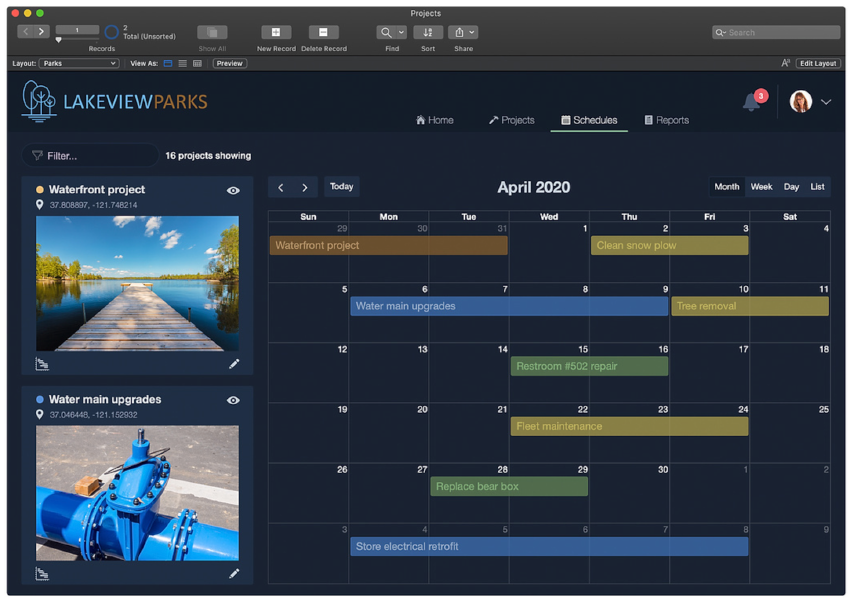
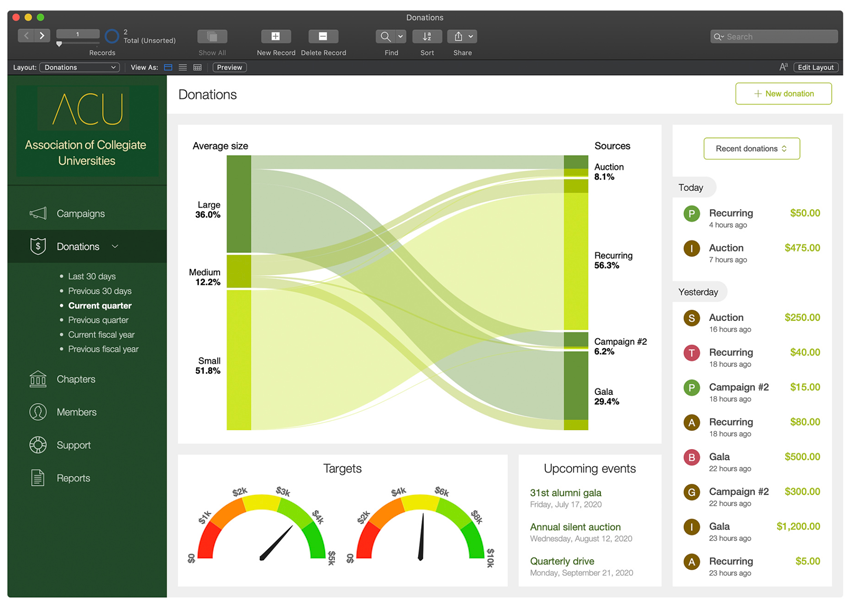
<h1><strong>Claris FileMaker Pro 19 桌機/iPad 範例</strong></h1>
<p><strong><img src="https://easyapps.biz/media/images/filemakerpro/19/10-FileMakerPro19-Example01.png" style="display: block; margin-left: auto; margin-right: auto;" title="Claris FileMaker Go 19 桌機/iPad 範例"></strong></p>
<p><strong><img src="https://easyapps.biz/media/images/filemakerpro/19/11-FileMakerPro19-Example03.png" style="display: block; margin-left: auto; margin-right: auto;" title="Claris FileMaker Go 19 桌機/iPad 範例"></strong></p>
<p><strong><img src="https://easyapps.biz/media/images/filemakerpro/19/12-FileMakerPro19-Example02.png" style="display: block; margin-left: auto; margin-right: auto;" title="Claris FileMaker Go 19 桌機/iPad 範例"></strong></p>
<br>
<br>

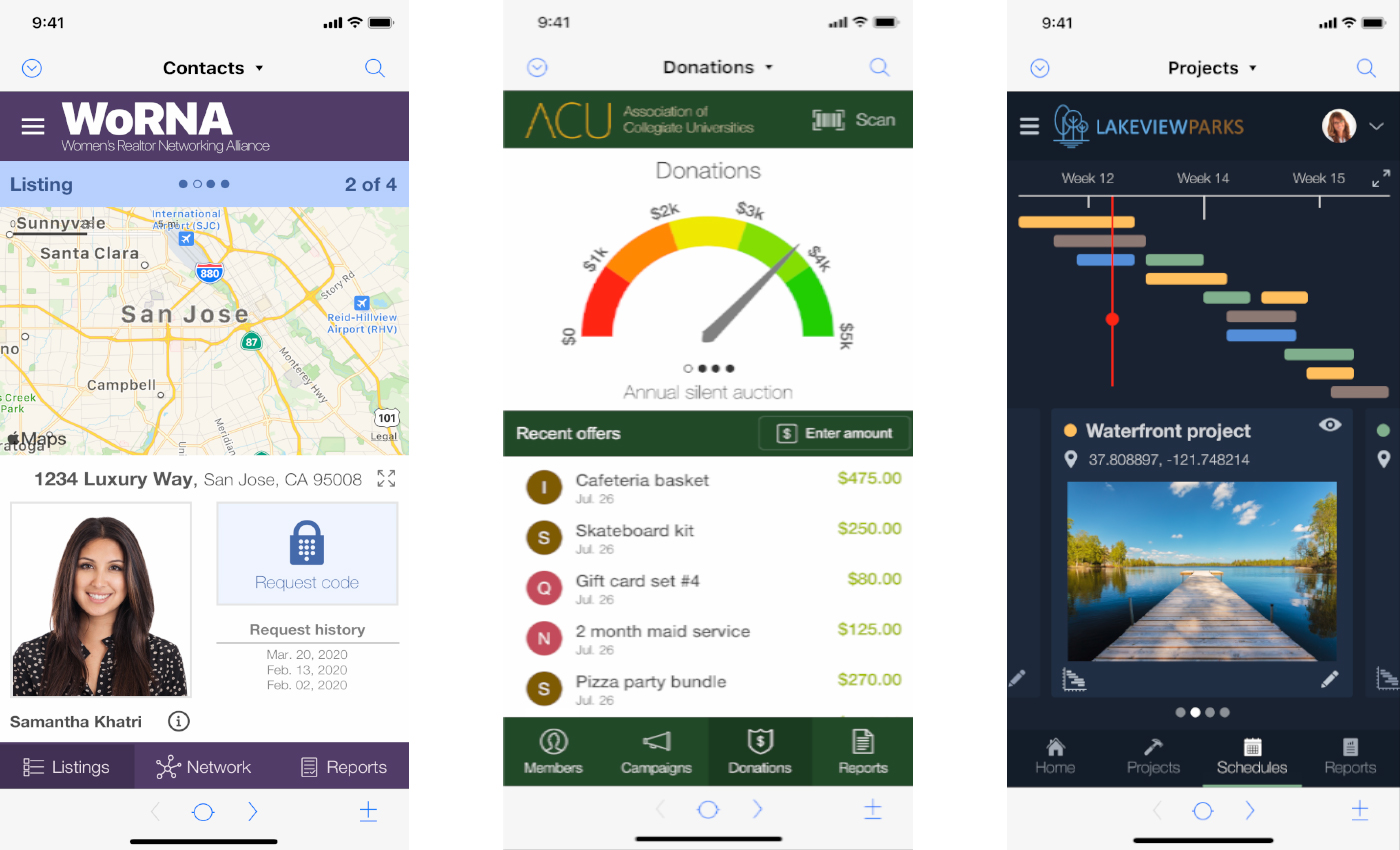
<h1><strong>Claris FileMaker Go 19 iPhone 範例</strong></h1>
<p><strong><img src="https://easyapps.biz/media/images/filemakerpro/19/Claris-FileMaker19-mobile.jpg" style="display: block; margin-left: auto; margin-right: auto; width: 850px; height: 516px;" title="Claris FileMaker Go 19 iPhone 範例"></strong></p>

<br>
<br>
<br>


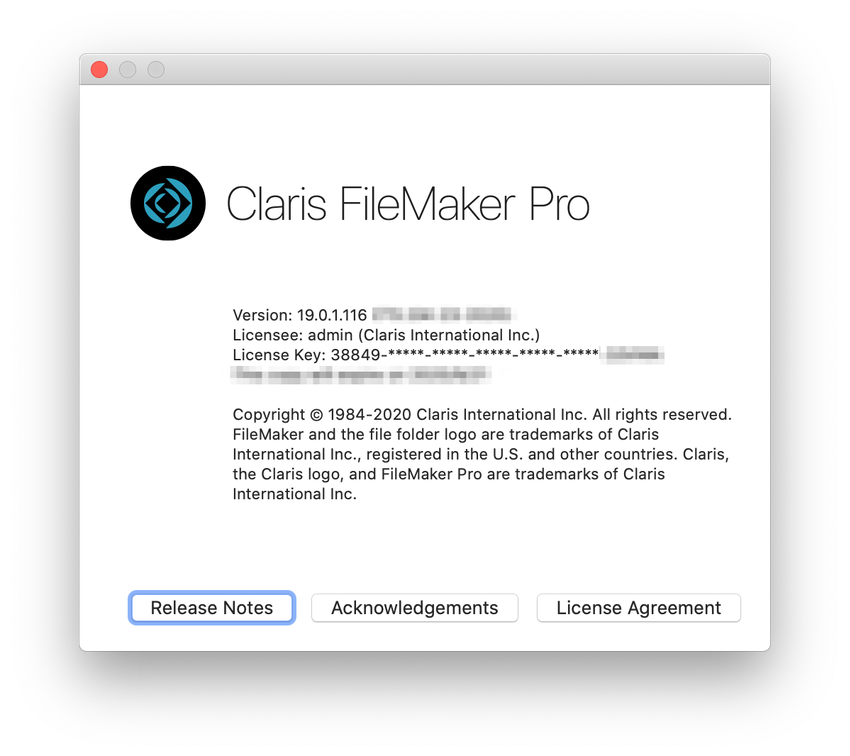
<blockquote><h1><strong>Claris Logo 與 Advanced 簡化名稱即為 FileMaker Pro</strong></h1><br>現今 19 版本開始，FileMaker Pro Advanced 更已簡化名稱，以後直接稱謂&nbsp;<strong>FileMaker Pro</strong>，原來的 Advanced 功能全部都有；而真正全名要冠上&nbsp;Claris FileMaker Pro，如果到軟體選單的File -&gt; About FileMaker Pro... 會看到下圖，為符合先前 FileMaker Inc. 換成&nbsp;<strong>Claris International Inc</strong>.，所以自然地在新版也都更換了 Claris&nbsp;Logo，包括了&nbsp;Claris FileMaker Server 的 ADMIN CONSOLE 也改了 Logo 與字樣。<br><br>FileMaker 19 版支援 FileMaker 12 - 19 資料庫版本，<strong>換句話說，新版能從 12 版到 19版的副檔名&nbsp;.fmp12 檔案都可以開啟</strong>。</blockquote>
<p style="text-align: center;"><strong><br></strong></p>
<p style="text-align: center;"><strong><img src="https://easyapps.biz/media/images/filemakerpro/19/01-Claris-FileMaker-Pro.png" style="width: 850px; height: 756px;"></strong></p>
<p style="text-align: left;"><strong>Claris FileMaker Server 的 ADMIN CONSOLE 也改了 Logo 與字樣</strong></p>
<p style="text-align: center;"><strong><img src="https://easyapps.biz/media/images/filemakerpro/19/Claris-FileMaker-Server19.png" style="width: 850px; height: 596px;" title="Claris FileMaker Server 19"></strong></p>]]></summary>
		<author>
			<name>socrates</name>
		</author>
		<link rel="enclosure" href="https://easyapps.biz/media/images/articles/Claris-Logo_thumb.png" length="2597" type="image/png" />
	</entry>
	<entry>
		<title><![CDATA[購買 SSL 加密服務，四年65折含稅最划算！]]></title>
		<link type="text/html" href="https://easyapps.biz/platform/buy-filemaker-ssl-service.html" />
		<id>urn:uuid:38e8da38-ed21-6bfa-9170-2b453379cd13</id>
		<updated>2019-07-28T01:52:00+00:00</updated>
		<summary type="html"><![CDATA[<img style="margin:5px; float:left;" src="https://easyapps.biz/media/images/articles/filemaker_ssl_secure_connection_thumb.png" alt="平台" /> <p>FileMaker 平台上的 SSL 加密服務</p><p><strong>為什麼 TLS 與 SSL 安全性如此重要？</strong></p><p>TLS（全名：Transport Layer Security）及前身SSL（全名：Secure Sockets Layer）是一種安全協定，
目的是為網際網路通訊提供安全及資料完整性保障，從網景公司（Netscape）自在1994發展至今，各全球軟體大廠早已響應與應用，由第三方專業憑證機構 Certificate Authority，CA&nbsp;提供，如：Sectigo(前身 Comodo CA&nbsp;)、GeoTrust、Comodo、Thawte、GoDaddy 等<meta>專業憑證機構商，購買內容是以年租為主。</p><p><span style="font-size: 14px;">如果您的資料是非常重要，不論您在咖啡館、餐廳、任何公開或私人上網地點，想要資料傳送間不用擔心被不良人士竊取、拷貝或取得，提高安全性等級，就必須加上一道 SSL 加密，
能盡量避免掉被人修改任何傳輸的資訊，通常使用時，會出現一個鎖頭圖示，如您的系統或使用客戶一旦看到有這樣的標誌，相對也能提昇對您公司或品牌的信賴程度。
您可以到任何知名大廠，如：Apple、Google、Microsoft、Amazon、Facebook，一定都會做上 SSL 加密，甚至更常見的任何購物網站也都會有這鎖頭圖示標誌， 所以像是購物網站沒有 SSL 加密，真的不建議在上面做任何購買交易。</span></p><p><br></p>]]></summary>
		<author>
			<name>socrates</name>
		</author>
		<link rel="enclosure" href="https://easyapps.biz/media/images/articles/filemaker_ssl_secure_connection_thumb.png" length="3110" type="image/png" />
	</entry>
	<entry>
		<title><![CDATA[FileMaker 17 新功能]]></title>
		<link type="text/html" href="https://easyapps.biz/platform/filemaker17-new-features.html" />
		<id>urn:uuid:a3fa7dd3-2f88-628d-7b8c-7e7f3a4d487d</id>
		<updated>2018-05-15T00:31:00+00:00</updated>
		<summary type="html"><![CDATA[<img style="margin:5px; float:left;" src="https://easyapps.biz/media/images/articles/FileMaker17-Platform_880x512_thumb.jpg" alt="平台" /> <p>注意：本頁內容由正洋保留修改、維護與更新，您可隨時回本頁閱讀，不另通知，謝謝您。</p><p>&nbsp;</p>

<p style="text-align: center;"><button class="elxbutton-search" onclick="window.location.href='/platform/filemaker-platform.html';">跨平台介紹</button>&nbsp; | &nbsp;&nbsp;<button class="elxbutton-search" onclick="window.location.href='/platform/filemaker14-new-features.html';">中文簡報</button>&nbsp; | &nbsp;&nbsp;<button class="elxbutton-search" onclick="window.location.href='/trial-download/trial-download.html';">下載試用</button>&nbsp; | &nbsp;<button class="elxbutton-save" onclick="window.location.href='/purchase/filemaker-query.html';">詢價購買</button></p>

<p>&nbsp;</p>


<p>&nbsp;</p>
]]></summary>
		<author>
			<name>socrates</name>
		</author>
		<link rel="enclosure" href="https://easyapps.biz/media/images/articles/FileMaker17-Platform_880x512_thumb.jpg" length="2902" type="image/jpeg" />
	</entry>
	<entry>
		<title><![CDATA[FileMaker 16 創新應用]]></title>
		<link type="text/html" href="https://easyapps.biz/platform/filemakerpro16.html" />
		<id>urn:uuid:4954ca63-397b-651d-6f28-6b775eb557d5</id>
		<updated>2017-05-18T01:44:50+00:00</updated>
		<summary type="html"><![CDATA[<img style="margin:5px; float:left;" src="https://easyapps.biz/media/images/articles/fmp16_thumb.png" alt="平台" /> <p>藍色字為 FileMaker 16 新功能</p><p>&nbsp;</p>

<p style="text-align: center;"><button class="elxbutton-search" onclick="window.location.href='/platform/filemaker14-new-features.html';">中文簡報</button>&nbsp; | &nbsp;&nbsp;<button class="elxbutton-search" onclick="window.location.href='/trial-download/trial-download.html';">下載試用</button>&nbsp; | &nbsp;<button class="elxbutton-save" onclick="window.location.href='/purchase/filemaker-query.html';">詢價購買</button></p>

<p>&nbsp;</p>

<p class="elx_sminfo">注意，本頁內容由正洋保留修改、維護與更新，您可隨時回本頁閱讀，不另通知，謝謝您。</p>

<hr />


<p>&nbsp;</p>
]]></summary>
		<author>
			<name>socrates</name>
		</author>
		<link rel="enclosure" href="https://easyapps.biz/media/images/articles/fmp16_thumb.png" length="8624" type="image/png" />
	</entry>
	<entry>
		<title><![CDATA[FileMaker 新線上文件與快捷鍵]]></title>
		<link type="text/html" href="https://easyapps.biz/platform/filemaker-online-help.html" />
		<id>urn:uuid:3219da34-aa33-8fe8-6aef-98b6f3b82845</id>
		<updated>2016-05-07T14:04:00+00:00</updated>
		<summary type="html"><![CDATA[<p>快速進入 FileMaker 最新參考文件</p><p>任何開發軟體，工具，像查字典一樣，會需要參考需要的指令、函數，很多人一時之前還要花時間找，FileMaker 最新線上文件，以及常用快速鍵 macOS/Windows&nbsp;，供您參考。</p>

<p>英文 <a href="https://help.claris.com/en/pro-help/content/index.html"><span style="color:#0066ff;">https://help.claris.com/en/pro-help/content/index.html</span></a><br>
簡體中文版 <a href="https://help.claris.com/zh/pro-help/content/index.html"><span style="color:#0066ff;">https://help.claris.com/zh/pro-help/content/index.html</span></a></p>


<p><br></p>


<p><br></p>


<p><br></p>


<hr id="null">]]></summary>
		<author>
			<name>socrates</name>
		</author>
	</entry>
	<entry>
		<title><![CDATA[FileMaker 15 新功能]]></title>
		<link type="text/html" href="https://easyapps.biz/platform/filemakerpro-15.html" />
		<id>urn:uuid:5c0b7f17-df9c-74ee-7948-2a6138157f53</id>
		<updated>2016-04-30T22:18:00+00:00</updated>
		<summary type="html"><![CDATA[<img style="margin:5px; float:left;" src="https://easyapps.biz/media/images/articles/3DTouch_thumb.png" alt="平台" /> <p>一覽所有 FileMaker 15 新功能</p><p>&nbsp;</p>

<p style="text-align: center;"><button class="elxbutton-search" onclick="window.location.href='/platform/filemaker14-new-features.html';">中文簡報</button>&nbsp; |&nbsp;&nbsp;<button class="elxbutton-search" onclick="window.location.href='/trial-download/trial-download.html';">下載試用</button>&nbsp; | &nbsp;<button class="elxbutton-save" onclick="window.location.href='/purchase/filemaker-query.html';">詢價購買</button></p>

<p>&nbsp;</p>

<p class="elx_sminfo">注意，本頁內容由正洋保留修改、維護與更新，您可隨時回本頁閱讀，不另通知，謝謝您。</p>

<hr />


<p>&nbsp;</p>
]]></summary>
		<author>
			<name>socrates</name>
		</author>
		<link rel="enclosure" href="https://easyapps.biz/media/images/articles/3DTouch_thumb.png" length="15178" type="image/png" />
	</entry>
	<entry>
		<title><![CDATA[FileMaker 指令腳本 (Script) 相容性列表]]></title>
		<link type="text/html" href="https://easyapps.biz/platform/filemaker-14-script-step-compatibility.html" />
		<id>urn:uuid:744f6ce1-0d08-89fd-f642-b08252b6f176</id>
		<updated>2016-03-09T12:44:00+00:00</updated>
		<summary type="html"><![CDATA[<img style="margin:5px; float:left;" src="https://easyapps.biz/media/images/articles/article94_thumb.png" alt="平台" /> <p>FileMaker 指令支援平台列表</p><p style="text-align: center;"><img alt="FileMaker 指令支援平台列表" src="https://easyapps.biz/media/images/articles/FileMaker-Script-Step-Compatibility.png" style="width: 649px; height: 232px;" title="FileMaker 指令支援平台列表"></p>

<h3><span style="font-size:16px;"><span style="font-size:16px;">指令(Script、腳本等同義)</span>配合表格關連性、函數、，能孕育出成千上萬更多的應用</span>，本列表以最新版本 14 為基礎，最新腳本，<a href="https://easyapps.biz/platform/filemaker-online-help.html"><span style="color:#0066ff;">請到最新版本查閱</span></a>；希望對您有參考價值。</h3>

<p>&nbsp;</p>

<p><span style="font-size:18px;">說明</span></p>

<p>FileMaker 的指令腳本已歷經 30 多年全球各大企業反覆運用，目前已支援大多數主流平台，因此在撰寫 APP 時，指令的支援性就顯得非常重要，才不會要的功能卻無法在平台上使用。<br>
不同平台用户端有支援的"適用性問題"，例如照片、掃瞄條碼、簽名等，這是在iPad / iPhone 上才能支援，反之亦然。</p>

<p>注意：如您要應用在 Android 平台，用戶端就須使用瀏覽器來存取，在伺服器上則需安裝 FileMaker Server 13 (包含以後版本)，佈置過程中，只要把資料庫檔案放在 Server 上，Server 會自動以 WebDirect 引擎產生 HTML5 格式網頁，供使用者存取 APP；記得要用 FileMaker Pro / Advanced 開啟 WebDirect 權限。</p>

<p class="elx_sminfo"><strong>平台相容性代表意義</strong></p>

<p class="elx_textblock">FMS = Server<br>
iOS = iPad / iPhone<br>
CWP = Custom Web Publishing(利用 PHP 整合 FileMaker 做自定義網頁)<br>
WD &nbsp;= FileMaker WebDirect<br>
Run = Runtime(表示編譯執行時)<br>
空白欄位代表不支援</p>
]]></summary>
		<author>
			<name>socrates</name>
		</author>
		<link rel="enclosure" href="https://easyapps.biz/media/images/articles/article94_thumb.png" length="28375" type="image/png" />
	</entry>
	<entry>
		<title><![CDATA[跨平台的 FileMaker #引導世界的創新工作平台]]></title>
		<link type="text/html" href="https://easyapps.biz/platform/filemaker-platform.html" />
		<id>urn:uuid:ad71ef28-3632-5874-d001-15119f217153</id>
		<updated>2015-05-06T10:39:00+00:00</updated>
		<summary type="html"><![CDATA[<img style="margin:5px; float:left;" src="https://easyapps.biz/media/images/articles/filemaker18-platform_thumb.png" alt="平台" /> <p>FileMaker 平台創新應用</p>]]></summary>
		<author>
			<name>King Chen</name>
		</author>
		<link rel="enclosure" href="https://easyapps.biz/media/images/articles/filemaker18-platform_thumb.png" length="6569" type="image/png" />
	</entry>
	<entry>
		<title><![CDATA[Claris FileMaker Server]]></title>
		<link type="text/html" href="https://easyapps.biz/platform/filemaker-server.html" />
		<id>urn:uuid:5391c035-6037-534a-45e6-76907d42ca7b</id>
		<updated>2015-05-06T09:51:00+00:00</updated>
		<summary type="html"><![CDATA[<img style="margin:5px; float:left;" src="https://easyapps.biz/media/images/articles2/claris-filemaker-server-2024_thumb.jpg" alt="平台" /> <p>請注意：本頁內容由明易保留修改、維護與更新，不另通知，您可隨時回本頁閱讀謝謝您。</p>


<p style="text-align: center;">FileMaker Server 新版哪些內容更新，<a href="https://easyapps.biz/platform/filemaker-platform.html">請參考平台頁面為準</a>。</p>

<p>&nbsp;</p>

<p style="text-align: center;"><button class="elxbutton-search" onclick="window.location.href='/platform/filemaker-platform.html';">跨平台介紹</button>&nbsp; | &nbsp;&nbsp;<button class="elxbutton-search" onclick="window.location.href='/platform/filemaker14-new-features.html';">中文簡報</button>&nbsp; | &nbsp;&nbsp;<button class="elxbutton-search" onclick="window.location.href='/trial-download/trial-download.html';">下載試用</button>&nbsp; | &nbsp;<button class="elxbutton-save" onclick="window.location.href='/purchase/filemaker-query.html';">詢價購買</button></p>

<p>&nbsp;</p>

<hr>

<blockquote>
    在此，也先提醒所有使用 FileMaker Server 用戶，一定要多加一台外接硬碟做資料庫備份，如同任何資訊備份安全，才是提高您的使用保險；您可以善用 macOS 內建 Time Macchine，設定一次後，每天會在沒使用或資源較少的情況下，自動幫您備份。
</blockquote>


<p><br></p>
<p><strong>特色介紹</strong><br>
    FileMaker Server 不具設計、開發功能，<u><strong>主要用在超過&nbsp;5 人以上共享、管理資料庫，或用戶需要透過瀏覽器 (WebDirect) 來使用 FileMaker&nbsp;Pro Advanced 做好的資料庫解決方案，Server 可以用在一次管理多個資料庫，以及資料庫自動備份，Log 記錄檔管理、管理使用者登入狀況、設定 SSL 安全性等，專門幫您做好做多個資料庫管理與多人連線等伺服端功能，並提供優秀的可靠性、穩定的資料庫服務存取。</strong></u></p>

<p>FileMaker Server 19&nbsp;支持以下用戶端來連線使用<br>
    <br>
    FileMaker Pro
    <meta>19, 18 及18 advanced 版本。（注意：官方自 19 版本開始，FileMaker Pro Advanced <strong>已簡化名稱為 FileMaker Pro</strong>，原 Advanced 功能都有，不再區分是 Pro 或 Advanced 版本。）<br>
    FileMaker Go 19 與 18&nbsp;版本。<br>
    使用 iOS App SDK 19&nbsp;與&nbsp;18&nbsp;版本建立的 Apps。<br>
    FileMaker WebDirect，即客戶端以瀏覽器來使用已開發好的應用。</p>

<p>&nbsp;</p>

<p><strong>使用時機與需求</strong></p>

<ul class="elx_stdul">
    <li>需要同時超過 5 人以上共享資料庫時。</li>
    <li>需要用戶以瀏覽器方式存取資料庫，新版更支援最新 Android 平版裝置，設計時，不需懂任何 HTML 程式碼，放到服務端立即幫您轉成 HTML 5 網頁格式</li>
    <li>需要資料庫自動排程與備份</li>
    <li>在伺服器啟動 ODBC / JDBC</li>
    <li>設定人員與群組在伺服端使用權限</li>
    <li>設定第三方專屬&nbsp;SSL 安全性認証，控制與認証連線數</li>
    <li>在伺服端有任何錯誤問題，可直接系統發信給管理者</li>
    <li>設定啟動伺服端 Plug-in</li>
    <li>可設定透過 Direct Service 連線</li>
    <li>可設定啟動 PHP / XML / FileMaker WebDirect 功能</li>
    <li>可用 FileMaker Data API 來連結到其他 Apps 或網路服務(Web Services)，也可用 FileMaker Admin API 在不同自行設計介面，來協助管理您的 Apps 需求。</li>
</ul>


<p style="margin-left: 20px;">

    </p>
<hr>
<p><br></p>
<p><strong>何謂 WebDirect ?</strong><br>
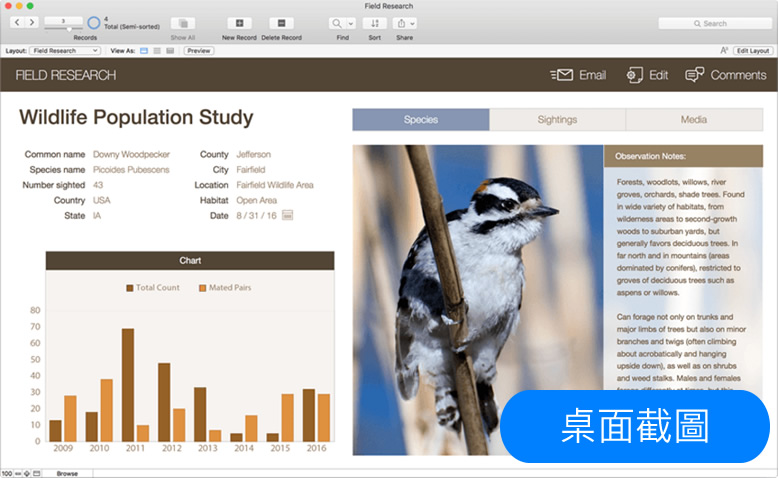
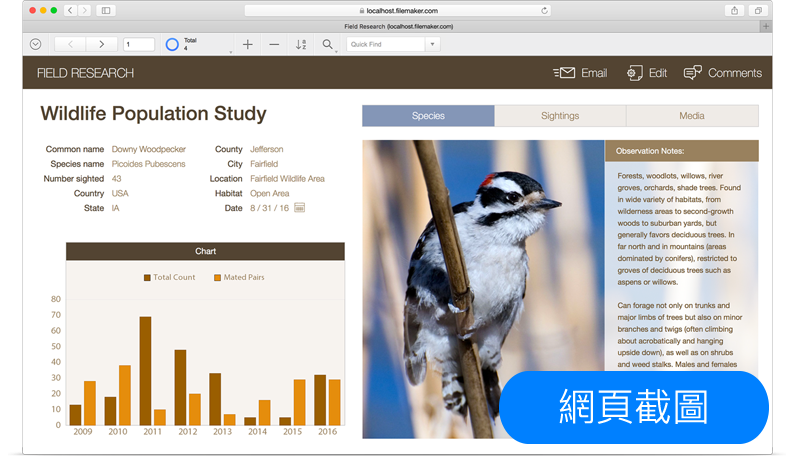
    當您利用 FileMaker 設計完成所要的資料庫應用，可以將應用開啟 WebDirect 分享功能，並上傳放置到 FileMaker Server，即產生 HTML5 動態網頁，使用者不用再學 PHP，HTML5，CSS，產生網頁內容與功能幾乎與您在桌面上的系統近 95% 相同，用戶即能在瀏覽器上使用您的系統；需注意的地方是，畢竟所有應用仍是桌面電腦上來得強大，在網頁上能<a href="http://help.filemaker.com/app/answers/detail/a_id/11998" target="_blank"><span style="color:#0066ff;">執行功能限制請參考</span></a>。</p>
<p>

    </p>
<p style="text-align: center;"><img alt="FileMaker Pro 應用" src="https://easyapps.biz/media/images/filemakerpro15/FileMakerPro_Desktop.jpg" style="width: 778px; height: 478px;"></p>
<p>

    </p>
<p style="text-align: center;">PC/Mac桌面應用畫面</p>
<p>

    </p>
<p style="text-align: center;"><br></p>
<p>

    </p>
<p style="text-align: center;">&nbsp;</p>
<p>

    </p>
<p style="text-align: center;"><img alt="FileMaker WebDirect 範例" src="https://easyapps.biz/media/images/filemakerpro15/FileMaker_WebDirect.png" style="width: 793px; height: 456px;"></p>
<p>

    </p>
<p style="text-align: center;">WebDirect：在瀏覽器上運行畫面</p>
<p>

    </p>
<p style="text-align: center;">&nbsp;</p>
<p>

    </p>
<p style="text-align: center;">&nbsp;</p>
<p>

    </p>
<p style="text-align: center;">&nbsp;</p>
<p>

    </p>
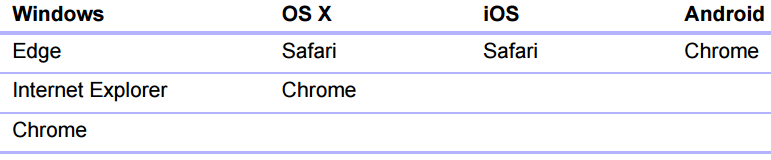
<p style="text-align: center;"><img alt="WebDirect支援哪些瀏覽器" src="https://easyapps.biz/media/images/fms/webdirect-supported-browser.png" style="width: 771px; height: 160px;" title="WebDirect支援哪些瀏覽器"></p>
<p>

    </p>
<p style="text-align: center;">以作業系統區別支援的瀏覽器</p>
<p>

    </p>
<p style="text-align: center;">&nbsp;</p>
<p>

    </p>
<p style="text-align: center;">&nbsp;</p>
<p>

    </p>
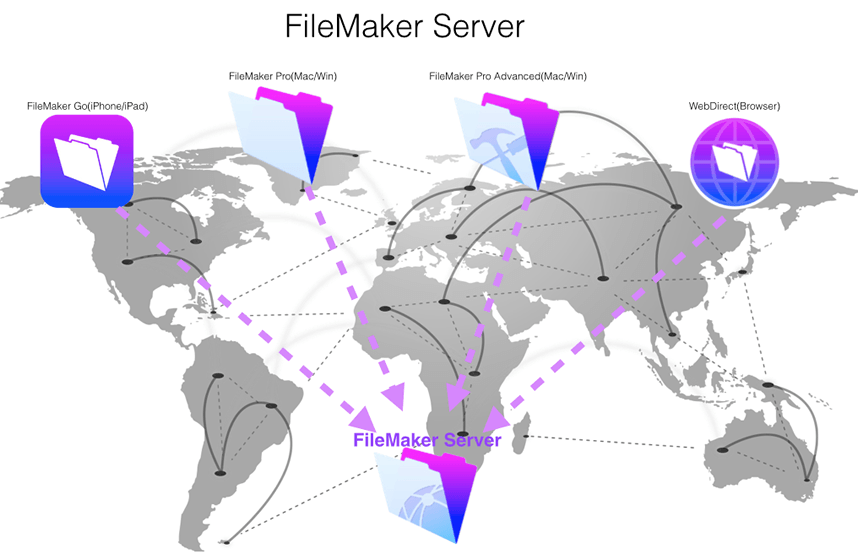
<p style="text-align: center;"><img alt="FileMaker Server 15" src="https://easyapps.biz/media/images/fms/fms15_demo.png" style="width: 858px; height: 555px;"></p>
<p>

    </p>
<p style="text-align: center;">適合多人連線，如：企業或部門跨國聯合作業實際應用</p>
<p>

    </p>
<p>&nbsp;</p>
<p>

    </p>
<p>&nbsp;</p>
<p>

    </p>
<p>&nbsp;</p>
<p>

    </p>
<p><strong>FileMaker Server 特色功能</strong></p>

<ul class="elx_stdul">
    <li>全新設計管理畫面，介面變得更清爽流線，傳送封包也變得更小，最短時間立即顯示。</li>
    <li>FileMaker Admin API trial 利用 REST API 存取管理 FileMaker Server，試用期至 2019年9月。。</li>
    <li>針對 FileMaker Data API 已不再以試用方式執行，並且改善了 REST API 支援了 FileMaker Server 腳本，及上傳檔案到容器(Container)欄位，與更多標準化的 API 格式等。</li>
    <li>Tableau 網頁資料連結器：採用 FileMaker Data API 可整合 Tableau 做更棒的視覺化資料呈現。</li>
    <li>PDF 網頁列印：直接在瀏覽器列印您要的 PDF 格式，如：發票、標籤、標誌等。也可以利用 FileMaker Server 執行 Script 存儲 PDF 資訊。</li>
    <li>支持 OAuth 2.0 帳號認証：可透過第三方的 OAuth 2.0 做管理帳號認証。</li>
    <li>&nbsp; 更多的用戶同時連線：WebDirect 即用客戶端瀏覽器可以最多同時 500 個連線到 FileMaker Server，注意，要依您的需求購買不同的連線數。</li>
    <li>自動與伺服器連線: 在網路中斷時，用戶端不管是用 FileMaker Pro 或 FileMaker Go，在恢復連線後，都會自動幫您連到伺服器，並且在您最後執行的作業畫面。</li>
    <li>強化安全性: 新版在安裝時，需請您提供一組 4 位數的 PIN 密碼，在您未來如果忘了後台登入的 Administrator 密碼，可以藉由 PIN 重設密碼。</li><li>支援 Odata。</li>
</ul><p><br>說明：Open Data Protocol，簡稱 OData，是一種工業標準 API，它提供了一種用於查詢和更新資料的標準方法，允許 REST API 客戶端訪問由 Claris FileMaker Cloud 和 Claris FileMaker Server 託管的 FileMaker 資料。 <br>

OData 符合 REST 架構，因此是一個 REST API。 OData 類似於開放式資料庫連接 (ODBC) 和 Java 數據庫連接 (JDBC)，因為它為 Excel 等第三方應用程序提供了訪問 FileMaker 資料的標準方法。</p>

<p>&nbsp;</p>

<p><br></p>
<hr>

<p><span style="color:#0066ff;">FileMaker Server 同時連線能力</span>&nbsp;(意指有多少用戶端 "同時"&nbsp;連到伺服器，此為 Client / Server 連線方式，<u><strong>只要您購買 FileMaker Server，用戶端就包含了 FileMaker Pro Advanced、FileMaker Go、瀏覽器都能存取使用。</strong></u>)</p>

<p><br></p>
<p class="elx_info">作業系統建議：您若情況允許，我們會建議使用 macOS&nbsp;做伺服端共享，效能、維護與整體 CP 值比 Windows 明顯卓越；用過 Mac 用戶都知道，就算用了 5 年仍像新的一樣快。</p>
<p>

    </p>
<table id="comtables">
    <thead>
        <tr>
            <th>用戶端連線方式</th>
            <th>官方已測試</th>
            <th>最大允許數</th>
        </tr>
    </thead>
    <tbody align="center">
        <tr>
            <td valign="middle">FileMaker Pro Advanced</td>
            <td valign="middle">500</td>
            <td valign="middle">2000</td>
        </tr>
        <tr>
            <td valign="middle">FileMaker Go(iPad/iPhone)<br>
                WebDirect(瀏覽器)</td>
            <td valign="middle">500</td>
            <td valign="middle">500</td>
        </tr>
        <tr>
            <td valign="middle">FileMaker Data API</td>
            <td valign="middle">500</td>
            <td valign="middle">500</td>
        </tr>
        <tr>
            <td valign="middle">Custom Web Publishing (CWP)**</td>
            <td valign="middle">500</td>
            <td valign="middle">2000</td>
        </tr>
        <tr>
            <td valign="middle">ODBC/JDBC</td>
            <td valign="middle">50</td>
            <td valign="middle">無限制*</td>
        </tr>
    </tbody>
</table>
<p>

    </p>
<p><br>
    * &nbsp; &nbsp;此最大連線數仍與您的硬體, 網路, 資料庫設計與作業系統狀況有關.<br>
    **&nbsp; &nbsp;多個用戶可以共享單一個 CWP 連線(CWP 係以 PHP 開發前端，資料庫用 FileMaker)， CWP 連線數是基於模擬要求事件，而不是永久連線</p>
<p>

    </p>
<p>&nbsp;</p>
<p style="margin-left: 20px;">

    </p>
<hr>
<p><br></p>
<p>FileMaker Server&nbsp;作為 Host 主機硬體建議，與用戶連線數多寡有關，官方建議至少如下（詳細最佳硬體佈署建議請參考「<a href="https://easyapps.biz/hardware-filemaker-server-using-webdirect.html"><span style="color:#0066ff;">主機佈署建議</span></a>」)</p>
<p>

    </p>
<table id="comtables">
    <thead>
        <tr>
            <th>瀏覽器同時連線數(WebDirect)</th>
            <th>是否建議2台佈署</th>
            <th>記憶體</th>
            <th>CPU</th>
        </tr>
    </thead>
    <tbody align="center">
        <tr>
            <td valign="middle">1-6</td>
            <td valign="middle">No</td>
            <td valign="middle">單台主機</td>
            <td valign="middle">單台主機</td>
        </tr>
        <tr>
            <td valign="middle">7-25</td>
            <td valign="middle">Yes</td>
            <td valign="middle">8 GB</td>
            <td valign="middle">4 核心</td>
        </tr>
        <tr>
            <td valign="middle">26-50</td>
            <td valign="middle">Yes</td>
            <td valign="middle">12 GB</td>
            <td valign="middle">8 核心</td>
        </tr>
        <tr>
            <td valign="middle">51-100（多台佈署支援 500 人同時連線)</td>
            <td valign="middle">Yes</td>
            <td valign="middle">16 GB</td>
            <td valign="middle">16 核心</td>
        </tr>
    </tbody>
</table>
<p>

    </p>
<p>&nbsp;</p>
<p style="margin-left: 20px;">

    </p>
<hr>
<p><br></p>
<p>行動裝置需求(手機或平板)</p>
<p>

    </p>
<table id="comtables">
    <thead>
        <tr>
            <th>系統</th>
            <th>支援裝置</th>
        </tr>
    </thead>
    <tbody align="center">
        <tr>
            <td valign="middle">iOS</td>
            <td valign="middle">
                iPad Pro (12.9", 11", and 10.5")<br>
                iPad 9.7"<br>
                iPad Air<br>
                iPad mini 5<br>
                iPad mini 4<br>
                iPhone XS<br>
                iPhone XS Max<br>
                iPhone XR<br>
                iPhone X<br>
                iPhone 8<br>
                iPhone 8 Plus<br>
                iPhone 7<br>
                iPhone 7 Plus<br>
            </td>
        </tr>
        <tr>
            <td valign="middle">Android</td>
            <td valign="middle">記憶體: 至少 3 GB RAM, CPU: 至少 2.1GHz 4 核心, 螢幕尺寸: 至少 5 吋</td>
        </tr>
    </tbody>
</table>
<p>

    </p>
<p>&nbsp;</p>
<p>

    </p>
<p>&nbsp;</p>
<p>

    </p>
<p>FileMaker Server 支援作業系統、桌面與手持裝置支援的瀏覽器，及可整合的資料庫列表。</p>
<p>註：PHP 已內建支援 7.1.x 以上版本</p>
<p>

    </p>
<table id="comtables">
    <thead>
        <tr>
            <th>支援作業系統</th>
            <th>桌面瀏覽器</th>
            <th>手機瀏覽器</th>
            <th>可整合資料庫</th>
        </tr>
    </thead>
    <tbody align="left">
        <tr>
            <td valign="middle">
                macOS Monterey 12.0 <br>
                macOS Big Sur 11.0 <br>
                macOS Catalina 10.15<br>
                Windows Server 2019 Standard Edition (with Desktop Experience)<br>
                Windows Server 2019 Datacenter (with Desktop Experience)*<br>
                Windows Server 2016 Standard Edition (with Desktop Experience)<br>
                Windows Server 2016 Datacenter (with Desktop Experience)*<br>
                FileMaker Server 19.2.1 and 19.1.2 支援 CentOS 7.8<br>
                FileMaker Server 19.3.1 minimum 支援以下<br>
                Ubuntu 18.04 LTS ( Long Term Support) Server<br>
                Ubuntu 18.04 LTS ( Long Term Support) Desktop*<br>
                註：* 星號表示可以支援，但官方並未完整測試。<br>
            </td>
            <td valign="middle">Safari 12.x 以上&nbsp; &nbsp;&nbsp;<br>
                Chrome 73&nbsp;以上&nbsp;&nbsp; &nbsp;<br>
                Internet Explorer 11.x&nbsp;&nbsp; &nbsp;<br>
                Microsoft Edge 44</td>
            <td valign="middle">Mobile Safari on iOS 12.x&nbsp;以上<br>
                Chrome 73&nbsp;minimum on Android 7.x 以上<br>
                註：沒列出的瀏覽器可能支援，但官方不保證</td>
            <td valign="middle">MS SQL Server 2017<br>
                MS SQL Server 2016<br>
                MS SQL Server 2014<br>
                MySQL 5.7.21&nbsp;Community Edition<br>
                Oracle 12c R2<br>
                Oracle 12c R1<br>
                Oracle 11g R2<br>
                IBM DB2 i 7.3&nbsp;(AS/400) (由 Actual Technologies Adapter)<br>
                IBM DB2 11.1 (由 Actual Technologies Adapter)<br>
                PostgreSQL 9.6.12 (由 Actual Technologies Adapter)</td>
        </tr>
    </tbody>
</table>
<p>

    </p>
<p>&nbsp;</p>
<p>
    </p>]]></summary>
		<author>
			<name>King Chen</name>
		</author>
		<link rel="enclosure" href="https://easyapps.biz/media/images/articles2/claris-filemaker-server-2024_thumb.jpg" length="8636" type="image/jpeg" />
	</entry>
	<entry>
		<title><![CDATA[Claris FileMaker Go]]></title>
		<link type="text/html" href="https://easyapps.biz/platform/filemaker-go.html" />
		<id>urn:uuid:c39d534b-1e2b-6c02-495a-4afdac64d2ea</id>
		<updated>2015-05-05T05:52:00+00:00</updated>
		<summary type="html"><![CDATA[<img style="margin:5px; float:left;" src="https://easyapps.biz/media/images/articles/article33_thumb.png" alt="平台" /> <p>FileMaker Go 17 特色介绍</p><p>&nbsp;</p>


<p>&nbsp;</p>

<p>&nbsp;</p>

<blockquote>
    <p style="text-align: left;"><span style="font-size:18px;">Claris FileMaker Go 是免費 App ，可以從 App Store 只搜尋關鍵字「 FileMaker」下載，或點下圖按鈕直接帶您到 App Store 頁面。<br>
            <br>在&nbsp;FileMaker Go 裡所有的 App，您都可以使用&nbsp;FileMaker Pro 軟體(
            <meta>需購買)設計出來，製作後可以放在 iPad / iPhone (iOS) 單機使用或放到多人連線的 FileMaker Server 做跨平台使用。</span></p>
</blockquote>

<p style="text-align: center;">&nbsp;</p><p style="text-align: center;">

<a href="https://www.filemaker.com/products/filemaker-go/appstore.html" target="_blank"><img src="https://easyapps.biz/media/images/clarisfilemaker-go-download.png" style="width: 300px;" title="最新下載 FileMaker Go for iPad iPhone" alt="FileMaker Go download on the App Store"></a>

</p><p style="text-align: center;"><a href="https://www.filemaker.com/products/filemaker-go/appstore.html" target="_blank"><img alt="FileMaker Go download on the App Store" src="/media/images/fmgo14/download-app-store.jpg" style="width: 135px; height: 40px;" title="最新下載 FileMaker Go for iPad iPhone"></a></p>

<p>&nbsp;</p>]]></summary>
		<author>
			<name>King Chen</name>
		</author>
		<link rel="enclosure" href="https://easyapps.biz/media/images/articles/article33_thumb.png" length="80625" type="image/png" />
	</entry>
	<entry>
		<title><![CDATA[Claris FileMaker Pro]]></title>
		<link type="text/html" href="https://easyapps.biz/platform/filemaker-pro-advanced.html" />
		<id>urn:uuid:255a4ccd-bdc4-9a8c-f09b-0648fd214097</id>
		<updated>2015-05-05T05:43:00+00:00</updated>
		<summary type="html"><![CDATA[<img style="margin:5px; float:left;" src="https://easyapps.biz/media/images/articles2/claris-filemaker-pro-2024_thumb.png" alt="平台" /> <p>請注意：本頁內容由正洋保留修改、維護與更新，不另通知，您可隨時回本頁閱讀謝謝您。</p>

<p>&nbsp;</p>

<p style="text-align: center;"><button class="elxbutton-search" onclick="window.location.href='/platform/filemaker-platform.html';">跨平台介紹</button>&nbsp; | &nbsp;&nbsp;<button class="elxbutton-search" onclick="window.location.href='/platform/filemaker14-new-features.html';">中文簡報</button>&nbsp; | &nbsp;&nbsp;<button class="elxbutton-search" onclick="window.location.href='/trial-download/trial-download.html';">下載試用</button>&nbsp; | &nbsp;<button class="elxbutton-save" onclick="window.location.href='/purchase/filemaker-query.html';">詢價購買</button></p>

<p>&nbsp;</p>

<hr>]]></summary>
		<author>
			<name>King Chen</name>
		</author>
		<link rel="enclosure" href="https://easyapps.biz/media/images/articles2/claris-filemaker-pro-2024_thumb.png" length="27071" type="image/png" />
	</entry>
	<entry>
		<title><![CDATA[FileMaker Pro 16]]></title>
		<link type="text/html" href="https://easyapps.biz/platform/filemaker-pro.html" />
		<id>urn:uuid:8bfafe95-ee5b-e3ce-0a82-ff69b2ca9045</id>
		<updated>2015-05-05T05:37:26+00:00</updated>
		<summary type="html"><![CDATA[<img style="margin:5px; float:left;" src="https://easyapps.biz/media/images/articles/filemakerpro-w470_thumb.png" alt="平台" /> <p>請注意：本頁內容由正洋保留修改、維護與更新，不另通知，您可隨時回本頁閱讀謝謝您。</p>

<p>&nbsp;</p>

<p style="text-align: center;"><button class="elxbutton-search" onclick="window.location.href='/platform/filemaker14-new-features.html';">中文簡報</button>&nbsp; |&nbsp;&nbsp;<button class="elxbutton-search" onclick="window.location.href='/trial-download/trial-download.html';">下載試用</button>&nbsp; | &nbsp;<button class="elxbutton-save" onclick="window.location.href='/purchase/filemaker-query.html';">詢價購買</button></p>

<p>&nbsp;</p>

<hr />
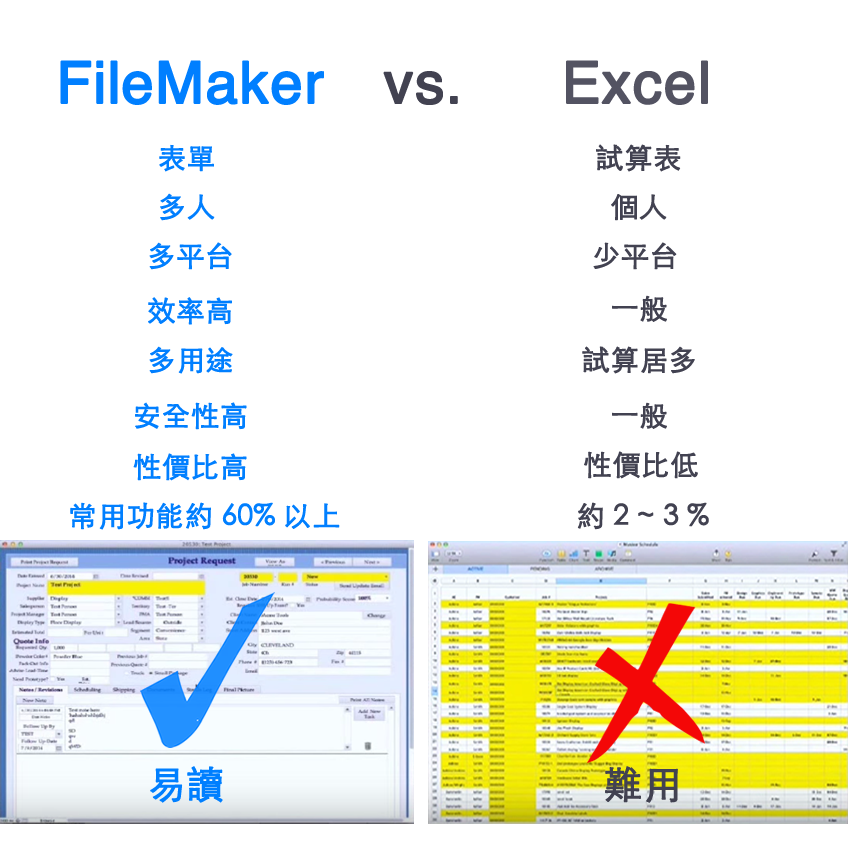
<p><strong>FileMaker VS. Excel</strong><br />
很多人問超過 30 年的 FileMaker，怎沒聽過? 並不意外，因為是您不知道，哪個才最適合您? 先帶您重點比一比，</p>

<p style="text-align: center;"><img alt="FileMaker vs Excel" src="https://easyapps.biz/media/images/fmp14/FileMaker-VS-Excel.png" style="width: 850px; height: 850px;" /></p>
]]></summary>
		<author>
			<name>King Chen</name>
		</author>
		<link rel="enclosure" href="https://easyapps.biz/media/images/articles/filemakerpro-w470_thumb.png" length="6738" type="image/png" />
	</entry>
	<entry>
		<title><![CDATA[FileMaker 中文介紹/簡報]]></title>
		<link type="text/html" href="https://easyapps.biz/platform/filemaker14-new-features.html" />
		<id>urn:uuid:3096ad8b-fd88-8ae9-beab-02b90e8fb2aa</id>
		<updated>2015-04-24T21:09:43+00:00</updated>
		<summary type="html"><![CDATA[<p>一覽 FileMaker 新功能</p>]]></summary>
		<author>
			<name>King Chen</name>
		</author>
	</entry>
</feed>