You are here Home » 熱門文章 » FileMaker 一行解決預覽 PDF

FileMaker 一行解決預覽 PDF

FileMaker 一行解決預覽 PDF

如何解決在容器無法顯示 PDF 問題?

FileMaker Pro 過去20幾年來一直可以跨平台運作,最近遇到有些用戶環境在 Windows 在預覽 PDF 內容時卻無法顯示,加上受限有些公司提供的給使用的主機有統一的系統使用原則與管理,您也不能任何修改或安裝軟體...等。

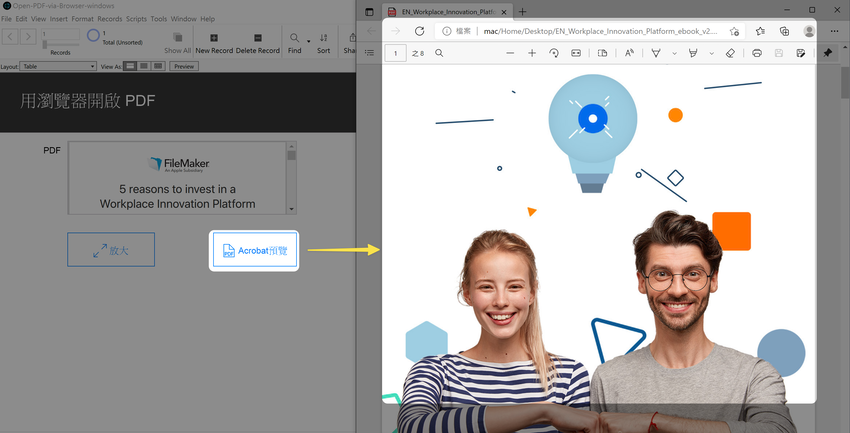
如果您有遇到這樣情況,可以試著重新安裝 Acrobat Reader 應該可以解決,另外,也有2種方式可以解套;如上圖所示,一種是在 FileMaker 另外的 Layout 去顯示,這一行指令就能解決 ;或直接以作業系統預設關連的 PDF 程式來開啟,大多是預設微軟 Edge 或 Adrobat Reader。

最後,FileMaker 本身用 Contaner 容器就能直接顯示與操作 PDF 了。若您有遇到這情形,也可以下載範例,上述二種方式都做上去了。希望對您有幫助。


Download file

Please fill in your name and email to download, all information is confidential, please rest assured!


追蹤FileMaker俱樂部就不會錯過最新好文喔 https://www.facebook.com/filemaker.club/


Leave a reply | Cancel reply

Please confirm that you are not a robot!
reply
Publish
Delete
Your comment will be published after a moderator approval.
https://easyapps.biz/inner.php/en/ajax
 
Please wait...

Comments

  • There are no comments for this article.
 
Please wait...

You are not allowed to post comments. Please login.

Copyright © 2006-2025 MINGYI Inc. All rights reserved. FileMaker logo or icon is a trademark of Claris International Inc. registered.
x

Login

You don't have an account? Register
x

Search