This in-depth article is written with a rigorous and security-first approach, based on official Claris documentation and years of real-world FileMaker implementation experience. It provides practical guidance on designing, implementing, and maintaining secure FileMaker systems for professionals who need a deeper understanding of authentication, system architecture, and operational security.
SummaryClaris International Inc. is an Apple company that has long regarded security as part of its DNA, placing customer security and privacy first. Providing customers with a secure and trusted environment is a fundamental priority that cannot be overlooked or compromised. Peter Nelson, Vice President of Engineering at Claris, stated, "Security and privacy are in our DNA." To demonstrate this commitment, Claris consistently applies industry-leading security practices. These values form part of the foundation of Claris. See Note 1.
```
Claris platform products such as Claris FileMaker Server and Claris FileMaker Pro have long been built using industry-standard security technologies. Platform services such as Claris FileMaker Cloud and Claris Connect are likewise designed around current security standards and protocols. The production infrastructure for FileMaker Cloud and Claris Connect is hosted by Amazon Web Services (AWS), whose data centers and services provide physical infrastructure, environmental controls, access-control mechanisms, and monitoring systems that enable Claris to deliver highly secure and highly available products. Apple also provides Claris with data center services supporting its network, identity platform, and physical-security systems. Through its continued commitment to product excellence and its relationships with AWS and Apple, Claris is able to provide enterprise-grade products that support digital transformation for organizations of all sizes.
```
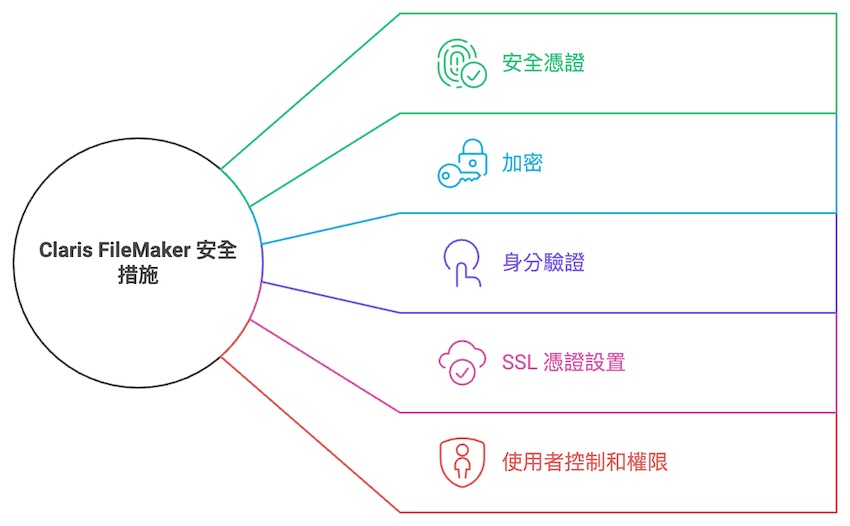
We will begin with five key areas of the security architecture. These topics will be discussed in greater detail later, together with additional considerations regarding field-level encryption design.
1. Security Credentials
Claris cloud services have obtained a SOC 2® Type 2 report (Service Organization Control Type 2) as well as ISO/IEC 27001 and ISO/IEC 27018 certifications. See Note 2. These assessments help demonstrate that a service organization provides a secure operating environment in which sensitive information and customer privacy can be managed, and that customer data is protected according to leading industry standards.
```
SOC reports are established by the American Institute of Certified Public Accountants (AICPA), one of the largest professional associations representing the accounting profession in the United States. See Note 3. They are widely regarded as a leading standard for evaluating the controls and practices of third-party service providers in relation to data and financial reporting.
There are two primary types of SOC reports: SOC 1 and SOC 2.
SOC 1 examines internal controls relevant to customers' financial reporting. SOC 2 evaluates controls related to areas such as organizational policies, communication procedures, and monitoring. The Trust Services Criteria established by the AICPA are based on five categories:
```
● Security — An organization's data and computing systems are adequately protected against unauthorized access, unauthorized or inappropriate disclosure of information, and potential damage to systems that could compromise processing integrity, availability, confidentiality, or privacy.
● Availability — Information and computing systems are available and operational as required to meet the organization's objectives.
● Processing Integrity — System processing is complete, accurate, valid, timely, and authorized so that the organization can achieve its objectives.
● Confidentiality — Information designated as confidential is appropriately protected in accordance with the organization's objectives.
● Privacy — Personal information that is collected, used, retained, stored, disclosed, or disposed of is handled in accordance with the organization's objectives.
Through Apple's certification processes, relevant services have also obtained British Standards Institution (BSI) certifications for Information Security Management (ISO/IEC 27001) and protection of personal information in cloud environments (ISO/IEC 27018). The latter falls within the area of information security management and includes additional privacy controls and implementation guidance for handling personally identifiable information (PII). ISO is one of the world's largest and most widely recognized organizations responsible for developing and publishing international standards across numerous industrial and commercial sectors.
```
Claris and Apple worked with external auditors to test the FileMaker Cloud and Claris Connect environments. The results confirmed that Claris's internal security design procedures and operations met the AICPA Trust Services Criteria for security, availability, and confidentiality.
```
Completion of the SOC 2 Type 2 examination and achievement of ISO certifications provide Claris platform users with independent third-party assurance that rigorous quality and security standards have been implemented and verified.
What are the benefits of a SOC 2® Type 2 report?
A SOC 2 audit is not limited to testing security controls within the core application. It also covers areas such as policy development, employee onboarding and offboarding processes, governance, risk assessment, vendor management, and other non-technical elements. Achieving compliance requires substantial time and resources across multiple departments. If an organization is not yet SOC 2 compliant and requires a Type 2 report, the process may take more than a year. The reporting period, which typically ranges from three months to one year, should not begin before the organization has reached compliance—that is, when all relevant controls have been implemented and are operating effectively. If the reporting period begins before that date, the organization may face numerous control exceptions because auditors may test controls all the way back to the first day of the reporting period. This means organizations requiring a Type 2 report must first invest the necessary time and effort to become compliant and then wait—sometimes for up to a full year—to demonstrate that the controls have continued to operate effectively. The audit itself may involve evaluating approximately 80 to 100 security controls. Collecting evidence for those controls alone can require two to four weeks.
Organizations should involve leadership early, establish effective cross-departmental communication, and obtain participation from all functions involved in supporting security-program governance, including human resources, IT, physical security, and others. The timeline for ISO certification depends on many factors, including the organization's understanding of the requirements, its level of preparedness, and its size and complexity.
```
2. Encryption
AES-256 encryption is used for data at rest and passwords. SSL/TLS 1.2 encryption is used for data in transit.
```
3. Authentication
Authentication can use built-in account credentials, Active Directory, Open Directory, or OAuth 2.0 identity providers. Multi-factor authentication (MFA) and passwordless authentication are also supported.
```
4. Simplified SSL Certificate Setup
Let's Encrypt is free and easy to use. Certificate requests and renewals can be automated using built-in system scripts in FileMaker Server for macOS or Ubuntu.
```
5. User Controls and Permissions in Admin Console
FileMaker Server administrators can gain better visibility into schedules and use improved tools to manage teams and users. Administrators can prevent new users from connecting when necessary to preserve maintenance integrity.
Admin Console also consolidates schedules into a single view, giving administrators better control and helping prevent conflicts between automated tasks.
```
Just as governments and companies establish governance standards based on scientific evidence and accumulated experience, international standards and certifications are developed to establish recognized security practices. Security certification and compliance demonstrate an ongoing commitment to maintaining rigorous controls for managing customer data through independent verification and certification. They also reflect a commitment to building innovative digital solutions. From security governance to technical security, key areas include the following:
```
Security Governance
Security and Control Environment
Information security teams are responsible for helping ensure the confidentiality, integrity, and availability of Apple and Claris information within facilities, equipment, or transmission networks owned by or directly operated in cooperation with Apple and Claris.
Specific methods used to achieve these objectives include, but are not limited to, developing and distributing security policies and procedures, conducting security assessments, monitoring and responding to security alerts, and responding to security incidents.
```
Technical Security
Claris uses global security frameworks to guide its security processes and controls. Key areas include physical security, authentication, encryption, network security, and system hardening.
In addition to using AWS for its hosting requirements as described above, the AWS services used by Claris have obtained the aforementioned SOC 2 Type 2 certification, including physical and environmental security controls for the data centers.
Claris also utilizes Apple IT services. Apple maintains high standards, which are reflected in the way its data centers are designed, built, and operated.
```
Apple has implemented security controls that restrict physical access to its facilities and critical systems, including, but not limited to, data centers, POD environments, and telecommunications rooms. These controls include proximity-badge access systems—with access strictly limited to what individuals require to perform their job responsibilities—biometric readers, facility surveillance systems, and visitor logs.
At the same time, the security of Claris systems, devices, and accounts begins with secure credential creation and management.
The Claris FileMaker Security Guide provides best practices for configuring security options, as illustrated below. See Note 11.

```
Multi-Factor Authentication
With multi-factor authentication, administrative access to the Claris environment is restricted to administrators. Claris applies the principle of least privilege throughout its environment.
Using role-based access control capabilities in AWS, Claris can assign highly granular permissions to different types of administrators, including server administrators, database administrators, network administrators, and others.
```
Claris ID
Claris ID is an integrated sign-in system used to authenticate users of Claris products and services. It also supports authentication through external identity providers, including Okta and Microsoft Active Directory.
```
OAuth Identity Provider Authentication
OAuth 2.0 can be used to authenticate Claris users who sign in to custom applications through third-party identity providers such as Amazon, Google, or Microsoft Azure.
```
Data Encryption
Protecting sensitive information is deeply embedded in the DNA of Claris. Encrypting data both in transit and at rest is one of the primary tools Claris uses and is a key part of its commitment to customers.
```
FileMaker uses multiple layers of encryption technology to protect both data in transit and data at rest. The details are as follows
1. Encryption in Transit
FileMaker uses SSL/TLS (Secure Sockets Layer / Transport Layer Security) protocols to encrypt data transmitted between clients and servers, helping ensure that data remains protected while traveling across the network.
```
TLS Protocol Version:
TLS 1.2 is supported and has been required since FileMaker Server 17.
Modern cryptographic algorithms such as AES-GCM and SHA-2 are used.
```
Certificate Management:
```
FileMaker supports both self-signed certificates and certificates issued by trusted CAs (Certificate Authorities).
Deploying an SSL certificate issued by a trusted CA is recommended to help ensure connection integrity.
Protection During Transmission:
Communications between clients (FileMaker Pro, WebDirect, or FileMaker Go) and FileMaker Server are encrypted.
This includes queries, record updates, container-data transfers, and other communications.
```
2. Encryption at Rest (EAR)
FileMaker provides AES-256 encryption. AES-256 (Advanced Encryption Standard with a 256-bit key) is widely recognized as one of the strongest commonly adopted encryption standards. See Note 4. It protects data stored within FileMaker database files through FileMaker Database Encryption.
```
How to Enable Encryption:
In FileMaker Pro, encryption can be configured with a password. From the menu, choose Tools > Developer Utilities..., add the fmp12 database file, click Solution Options, select Enable Database Encryption, and specify a strong password to protect the encryption key.
```
Password Management
Losing the encryption password may make it impossible to decrypt the database, so the password should be stored securely.
On Windows, Credential Manager can be used to store credentials automatically. On macOS, including iOS and iPadOS devices, credentials can be stored in Keychain. External key-management systems such as HSMs or password-management tools can also be used to strengthen security.
```
Text and Container Field Encryption
Built-in encryption functionality includes the CryptEncrypt and CryptDecrypt functions. See Note 5. These functions allow you to specify encryption algorithms and other parameters.
```
Script Step Example:
``` #Encrypt data Set Variable [$encryptedData; Value: CryptEncryptBase64 ( $originalData ; $key )]```
#Decrypt data Set Variable [$decryptedData; Value: CryptDecryptBase64 ( $encryptedData ; $key )]
FileMaker supports encryption of externally stored container data, helping ensure that media files stored on the server are also protected.
```
Network Security
Firewalls are an important component of any security strategy. In general, a firewall is a control used to prevent certain types of network traffic from entering a private network.
Claris uses firewalls throughout its network and between different network zones, including application firewalls, web application firewalls, and network-layer firewalls.
Network traffic is also continuously monitored. For more information, see the Logging and Monitoring section.
```
Logging
There are two important points to note:
First, FileMaker Data API and OData operations do not directly trigger OnWindowTransaction events. However, scripts executed through the FileMaker Data API or OData can trigger OnWindowTransaction events.
Second, operations performed within records or transactions that are subsequently reverted do not trigger OnWindowTransaction events.
Security White Paper
Wim Decorte and Steven H. Blackwell are experts who have studied FileMaker security for many years. They authored a white paper titled SECURITY CHANGES AND ENHANCEMENTS IN FILEMAKER® PRO 2024 (V-21), which discusses numerous specific topics related to developer privileges and areas of security control. See Note 14.
```
Strengthening Security Awareness
Every software product or platform requires ongoing security maintenance and updates. New software versions generally address newly discovered security issues. This does not mean that everyone must always use the newest version immediately; rather, it is important to understand whether an update addresses significant security vulnerabilities. Using outdated versions generally introduces greater risk, especially after a product is no longer supported. Once support ends, security updates may no longer be provided to protect against network threats, compatibility problems, degraded performance, or increasing numbers of errors and crashes. Keeping systems upgraded to a currently supported version can help reduce these risks.
```
Case Study```
In the past, FileMaker was affected by a dylib hijacking issue discovered by Alexey Dubov.
Terminology: What is a dylib? Developers use several different terms to refer to dynamically shared libraries, including dynamically linked shared libraries, dynamic libraries, DLLs, dylibs, or simply shared libraries.
In OS X, these terms refer to the same general concept: a library of code that is dynamically loaded into a process at runtime.
``` This hijacking issue could potentially allow a malicious actor to use a dylib to capture a password and gain access to a database. More specifically, the issue affected versions before v20.1.x and was addressed in FileMaker Pro 20.2 and later. This is one example of why version updates can be important. There is no need for unnecessary alarm; security issues are typically addressed once identified. The important point is to remain aware of security updates and keep systems appropriately maintained. Again, no modern system can remain permanently perfect or completely free of vulnerabilities.
Readers who are interested can refer to the article "FileMaker, dylib hijacking" in Note 8, as well as the related CVE notices in Notes 9 and 10.
```
Business Continuity and Disaster Recovery
Data Management and Privacy
Customer information used by Claris for user management, such as names, email addresses, and telephone numbers, is retained according to customer requirements and handled in accordance with the Claris Privacy Policy.
```
```
The following checklists are provided as references. Not every item is mandatory, and controls should be adjusted according to the specific deployment environment and security requirements.
```
FileMaker Pro Database System Checklist
FileMaker Server Checklist
General Recommendations
Note 1:Claris achieves SOC 2 Type 2 and ISO credentials for secure low-code deployment
```
Note 2:Apple services covered by ISO/IEC 27001 and ISO/IEC 27018
Note 3:SOC 2® Type 2 and ISO accreditations — SOC 2 is an attestation-reporting framework established by the American Institute of Certified Public Accountants (AICPA)
Note 4:AES 256-bit encryption for data has been supported since version 13. The encryption cannot simply be reversed, and if the encryption password is lost, the file cannot be opened.
Additional note: In 2012, The Wall Street Journal cited a striking statistic: "Companies with 11 to 100 employees were attacked more than ten times as frequently as companies in the next larger category of 100 to 1,000 employees." Fortunately, the FileMaker platform provides controls over user access to solutions at a granular level, helping organizations protect valuable data.
Note 5:CryptEncrypt function documentation
Note 6:Apple Security Bounty
Note 7:Apple Security Bounty Categories
Note 8:
FileMaker, dylib hijacking
Note 9:
CVE-2024-27790 — Claris International addressed an issue that could potentially allow unauthorized access to records stored in databases hosted by FileMaker Server.
Note 10:CVE (Common Vulnerabilities and Exposures)
CVE (Common Vulnerabilities and Exposures) is a publicly accessible database used to identify and catalog known security vulnerabilities. The CVE system provides a standardized reference method for analyzing and classifying information-security vulnerabilities, helping security professionals and organizations manage and respond to these risks more effectively.
Note 11:
Claris FileMaker Security Guide: Best Practices for Configuring Security Options
Note 12:
Managing Security
Note 13:
Report a security or privacy vulnerability
Note 14:Security White PaperReport a security or privacy vulnerability
You are not allowed to post comments. Please login.